AutoML Guide
Endgame provides a full AutoML system that automatically profiles data, checks
quality, selects and trains models, tunes hyperparameters, builds ensembles,
optimizes thresholds, generates explanations, and produces a structured
performance report — all behind a single fit / predict call.
Import convention: import endgame as eg
Architecture
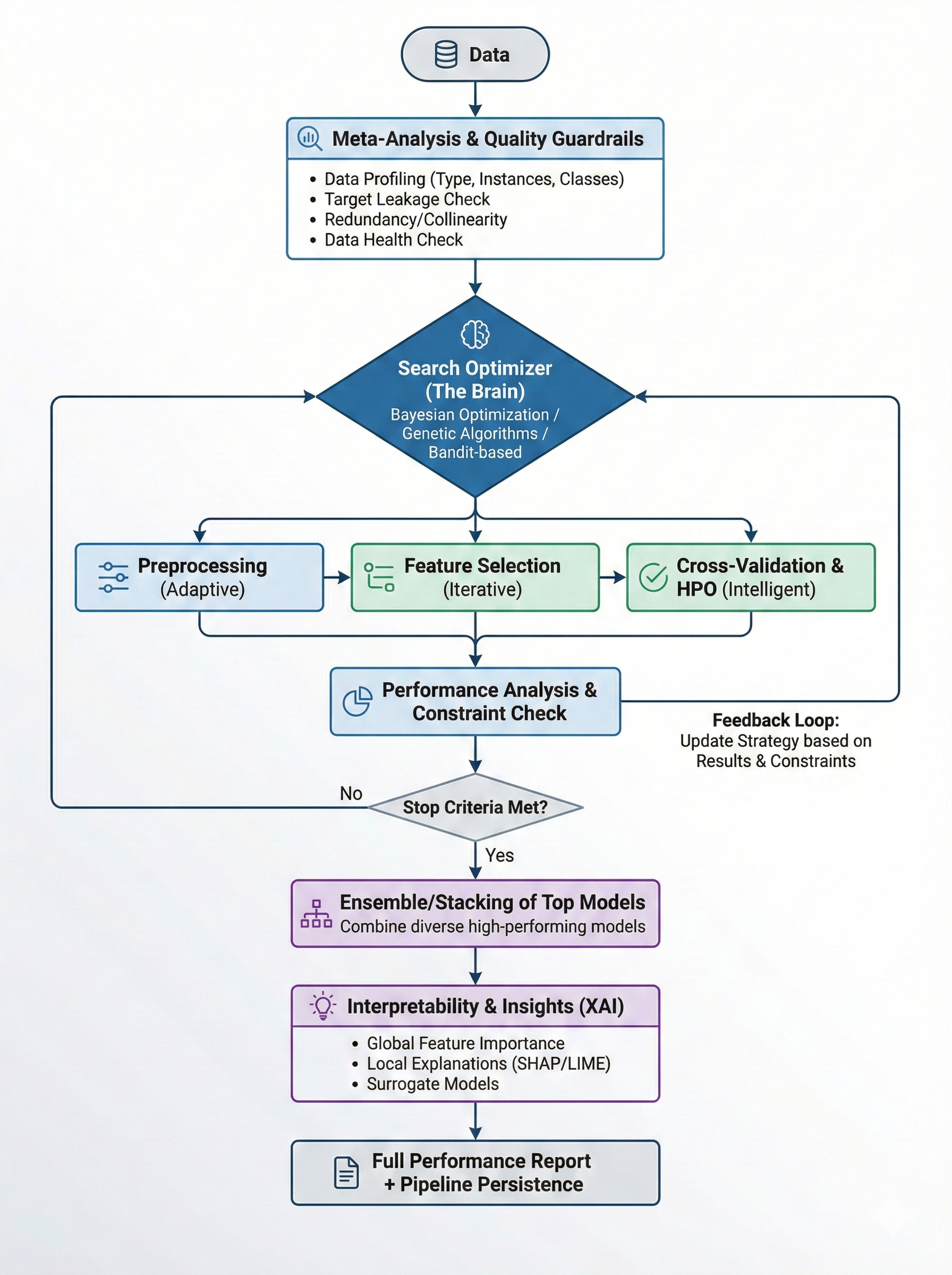
The AutoML pipeline executes 16 stages with intelligent time budget management. Each stage receives a fraction of the total time budget and unused time is automatically redistributed to later stages.
# |
Stage |
Purpose |
|---|---|---|
1 |
Profiling |
Extract dataset meta-features (size, types, class balance, correlations) |
2 |
Quality Guardrails |
Detect target leakage, feature redundancy, data health issues |
3 |
Data Cleaning |
Handle missing values, remove constant columns |
4 |
Preprocessing |
Encoding, scaling, imputation |
5 |
Feature Engineering |
Aggregations, interactions, polynomial features |
6 |
Data Augmentation |
SMOTE, ADASYN for imbalanced datasets |
7 |
Model Selection |
Search strategy suggests model configurations |
8 |
Model Training |
Train models with cross-validation from 76 registered models |
9 |
Constraint Check |
Validate models against deployment constraints (latency, size) |
10 |
Hyperparameter Tuning |
Optuna-based HPO for top-3 models |
11 |
Ensembling |
Hill climbing, stacking, blending, rank averaging, or auto-selection |
12 |
Threshold Optimization |
Optimize classification decision thresholds on OOF predictions |
13 |
Calibration |
Probability calibration (Platt, isotonic, temperature scaling) |
14 |
Post-Training |
Knowledge distillation, conformal prediction |
15 |
Explainability |
SHAP feature importances and feature interactions |
16 |
Persistence |
Save trained models and pipeline artifacts to disk |
After the linear pipeline completes, a feedback loop can run up to 3 additional iterations if time permits — updating the search strategy with results, suggesting new model configurations, and re-running ensembling with all models.
When keep_training=True, the pipeline enters a continuous optimization
loop that alternates between model search, training, optional HPO, and
re-ensembling until convergence or interruption.
A performance report is generated after the pipeline finishes, summarizing the full run with leaderboard, stage timing, quality warnings, tuning results, and top features.
Quick Start
from endgame.automl import TabularPredictor

predictor = TabularPredictor(label="target", presets="best_quality")
predictor.fit(train_df)

y_pred  = predictor.predict(test_df)
y_proba = predictor.predict_proba(test_df)

predictor.leaderboard()
leaderboard() returns a pandas.DataFrame ranked by validation score, one
row per trained model:
                 model  val_score  fit_time_s  pred_time_s
0        LGBMWrapper      0.9312       14.2         0.04
1         XGBWrapper      0.9287       18.6         0.06
2       FTTransformer      0.9241       92.0         0.31
3   HillClimbingEnsemble  0.9341        2.1         0.41
Constructor Parameters
TabularPredictor accepts the following parameters:
Parameter |
Type |
Default |
Description |
|---|---|---|---|
|
|
(required) |
Name of the target column |
|
|
|
|
|
|
|
Evaluation metric ( |
|
|
|
Quality preset (see Preset System) |
|
|
|
Time budget in seconds. |
|
|
|
Search strategy (see Search Strategies) |
|
|
|
Track experiments to the meta-learning database |
|
|
|
Path to save outputs (models, logs) |
|
|
|
Random seed for reproducibility |
|
|
|
Verbosity level (0=silent, 1=progress, 2=detailed, 3=debug) |
|
|
|
Experiment logger instance (e.g. MLflow) |
|
|
|
Deployment constraints (latency, model size) |
|
|
|
Abort on critical quality issues instead of warning |
|
|
|
Directory for incremental checkpoints. Saves top-N models after key stages |
|
|
|
Enable continuous optimization loop after main pipeline |
|
|
|
Consecutive rounds without improvement before stopping (continuous loop). Set to |
|
|
|
Minimum score improvement to count as progress |
|
|
|
Minimum time budget (seconds) per model. Stops training stage if remaining time is less than this |
|
|
|
Hard ceiling (seconds) per model. Prevents slow models from monopolizing the budget |
|
|
|
Model names to exclude from the search |
|
|
|
Early stopping patience for GBDT models (LightGBM, XGBoost, CatBoost) during CV |
|
|
|
Enable GPU acceleration for supported models |
predictor = TabularPredictor(
    label="target",
    presets="best_quality",
    time_limit=7200,
    checkpoint_dir="checkpoints/",
    keep_training=True,
    patience=10,
    min_improvement=1e-5,
    excluded_models=["saint", "tabpfn"],
    early_stopping_rounds=100,
)
predictor.fit(train_df)
Preset System
The preset argument controls the quality / speed trade-off. Seven built-in
presets are available:
Preset |
Description |
Default time |
CV folds |
Ensemble |
HPO |
|---|---|---|---|---|---|
|
Maximum accuracy, all model families |
No limit |
8 |
Auto (6 methods) |
100 trials |
|
High accuracy, most model families |
4 hours |
5 |
Auto (6 methods) |
50 trials |
|
Balanced speed and quality |
1 hour |
5 |
Auto (6 methods) |
25 trials |
|
Fast with reasonable quality (default) |
15 min |
5 |
Auto (6 methods) |
10 trials |
|
GBDTs only, no HPO or ensembling |
5 min |
3 |
None |
None |
|
Glass-box models only (EBM, GAM, rules, trees) |
15 min |
3 |
None |
25 trials |
|
Evolutionary search over all models + preprocessing + ensembles |
No limit |
3 |
Auto (6 methods) |
Genetic |
# Fast experiment — good for initial data exploration
predictor = TabularPredictor(label="target", presets="fast")
predictor.fit(train_df)

# Competition-grade — leave running overnight
predictor = TabularPredictor(label="target", presets="best_quality")
predictor.fit(train_df)

# Regulatory/compliance — interpretable models only
predictor = TabularPredictor(label="target", presets="interpretable")
predictor.fit(train_df)
Each preset defines time allocations for all 16 pipeline stages, curated model
pools, and search budgets. See endgame/automl/presets.py for full details.
Prediction Methods
TabularPredictor provides four prediction methods:
predict(data, model=None)
Returns point predictions. For classification, applies threshold optimization automatically when available (trained during the threshold optimization stage on OOF predictions). For regression, returns raw predicted values.
y_pred = predictor.predict(test_df)

# Use a specific model instead of the ensemble
y_pred = predictor.predict(test_df, model="lgbm_standard")
predict_proba(data, model=None)
Returns probability predictions for classification tasks. Applies calibration automatically when a calibrator was fitted during the calibration stage.
y_proba = predictor.predict_proba(test_df) # shape (n_samples, n_classes)
predict_sets(data, alpha=0.1)
Returns conformal prediction sets (classification) or prediction intervals
(regression) with statistical coverage guarantees. Requires a preset that
enables conformal prediction (best_quality or high_quality with validation
data).
# 90% coverage prediction sets
pred_sets = predictor.predict_sets(test_df, alpha=0.1)

# Classification: boolean array (n_samples, n_classes) — True = class in set
# Regression: array (n_samples, 2) — [lower_bound, upper_bound]
predict_distilled(data)
Returns predictions from the lightweight distilled student model, trained via knowledge distillation from the ensemble teacher. Faster inference while approximating ensemble accuracy.
y_fast = predictor.predict_distilled(test_df)
Search Strategies
Eight search strategies are available:
Strategy |
Description |
|---|---|
|
Diverse model portfolio with heuristic ranking (default) |
|
Data-driven rules based on meta-features |
|
Evolutionary optimization of full pipelines (model + preprocessing + hyperparameters) |
|
Random valid pipeline sampling |
|
Optuna-based Bayesian optimization |
|
Successive Halving multi-fidelity search |
|
Meta-strategy: Portfolio → Bayesian on stagnation |
predictor = TabularPredictor(
    label="target",
    presets="good_quality",
    search_strategy="bayesian",
)
predictor.fit(train_df)
Bandit Search (Successive Halving)
The 'bandit' strategy implements multi-fidelity optimization via Successive
Halving. Many configurations are trained cheaply on small data fractions, and
only the top performers are promoted to progressively larger fractions. This is
far more time-efficient than training every configuration on the full dataset.
Rung 0: Train all configurations on ~11% of data
Rung 1: Promote top 1/3 to ~33% of data
Rung 2: Promote top 1/3 to 100% of data
The reduction factor (eta=3) controls how aggressively configurations are
pruned at each rung.
predictor = TabularPredictor(
    label="target",
    presets="good_quality",
    search_strategy="bandit",
)
predictor.fit(train_df, time_limit=1800)
Adaptive Search
The 'adaptive' strategy is a meta-strategy that switches between
sub-strategies based on performance feedback:
Phase 1 — Portfolio: Diverse model sweep for broad coverage (first 15 rounds)
Phase 2 — Bayesian: Focused HPO on top performers (unlimited rounds)
The switch happens early when the current strategy stagnates (no improvement for 5 consecutive rounds).
predictor = TabularPredictor(
    label="target",
    presets="high_quality",
    search_strategy="adaptive",
)
predictor.fit(train_df, time_limit=3600)
Genetic / Evolutionary Search
The 'genetic' strategy treats the entire pipeline as a genome and evolves it
using tournament selection, crossover, and mutation. Each individual encodes:
Model choice and hyperparameters
Preprocessing steps (imputation strategy, scaling, encoding)
Feature selection method and top-k count
Dimensionality reduction (PCA, none)
predictor = TabularPredictor(
    label="target",
    presets="good_quality",
    search_strategy="genetic",
)
predictor.fit(train_df, time_limit=3600)
The genetic search is most effective with longer time budgets (30+ minutes) where
it has room for multiple generations. For quick experiments, 'portfolio' or
'heuristic' converge faster.
Quality Guardrails
The guardrails stage runs early in the pipeline and checks for:
Target leakage — features with |correlation| > 0.95 with the target
Feature redundancy — feature pairs with |correlation| > 0.98
Data health — constant columns, all-missing columns, too few samples, extreme feature-to-sample ratio, minority class < 1%, ID-like columns
By default, issues are logged as warnings and the pipeline continues. To abort on critical issues:
predictor = TabularPredictor(
    label="target",
    presets="good_quality",
    guardrails_strict=True,  # Abort on critical issues
)
predictor.fit(train_df)
Quality warnings are included in the performance report:
report = predictor.report()
for warning in report.quality_warnings:
    print(f"[{warning.severity}] {warning.message}")
Deployment Constraints
Specify deployment constraints to automatically filter out non-compliant models:
from endgame.automl import TabularPredictor, DeploymentConstraints

predictor = TabularPredictor(
    label="target",
    presets="good_quality",
    constraints=DeploymentConstraints(
        max_predict_latency_ms=10.0,   # Max 10ms per 100-sample batch
        max_model_size_mb=50.0,        # Max 50MB serialized
        require_interpretable=False,   # Allow black-box models
    ),
)
predictor.fit(train_df)
The constraint check stage runs after model training and before HPO, measuring prediction latency and model size for each trained model. Non-compliant models are flagged in the report but still available for inspection.
Intelligent CV Selection
The pipeline automatically selects the most appropriate cross-validation strategy based on data characteristics:
Data Characteristic |
CV Strategy |
Notes |
|---|---|---|
Time series detected |
|
Uses purging and embargo to prevent lookahead |
Group column present |
|
Keeps groups intact across folds |
Small dataset (< 500 samples) |
|
3 repeats for stable estimates |
Imbalanced classification |
|
Preserves class balance in each fold |
Default classification |
|
Standard stratified k-fold |
Default regression |
|
Standard k-fold |
The strategy is chosen once per run and applied consistently across all model
evaluations. The number of folds is set by the preset (e.g. 8 for
best_quality, 5 for good_quality, 3 for fast).
Hyperparameter Tuning
When enabled in the preset (hyperparameter_tune=True), the HPO stage selects
the top-3 models by CV score and tunes them with Optuna. Tuning spaces are
defined per model in the model registry (e.g., lgbm_standard, xgb_standard,
catboost_standard).
The time budget for HPO is divided evenly across the top models. If tuning improves a model’s score, the tuned version replaces the original.
# HPO is enabled by default for good_quality and above
predictor = TabularPredictor(label="target", presets="good_quality")
predictor.fit(train_df, time_limit=3600)

# Check tuning results
report = predictor.report()
for entry in report.tuning_summary:
    print(f"{entry['model']}: {entry['original_score']:.4f} → {entry['tuned_score']:.4f}")
Ensembling
After individual models are trained, TabularPredictor builds an ensemble.
When the preset uses ensemble_method="auto" (default for most presets), all
six ensemble methods are tried and the best is selected by OOF score:
Method |
Description |
|---|---|
Hill climbing |
Forward model selection optimizing the evaluation metric |
Stacking |
Meta-learner trained on out-of-fold predictions |
Optimized blend |
Optuna-optimized blending weights |
Power blend |
Score-proportional power weighting |
Rank averaging |
Rank-based blending for heterogeneous predictions |
Uniform averaging |
Simple equal-weight averaging (baseline) |
The fast and interpretable presets disable ensembling (ensemble_method="none")
to prioritize speed and interpretability respectively.
Ensembling runs after HPO and threshold optimization, so it operates on the best available versions of each model.
Threshold Optimization
For classification tasks, the threshold optimization stage finds optimal decision thresholds using out-of-fold predictions. This is particularly valuable for imbalanced datasets where the default 0.5 threshold is suboptimal.
The optimized thresholds are automatically applied in predict() when
available. This is transparent — no code changes needed.
Continuous Training
When keep_training=True, the predictor enters a continuous optimization loop
after the main pipeline completes. This loop alternates between:
Model search — ask the search strategy for new configurations
Training — fit the suggested configurations with CV
Optional HPO — run Optuna on the best models if time permits
Re-ensembling — rebuild the ensemble with the expanded model pool
The loop runs until one of:
patienceconsecutive rounds without improvement exceedingmin_improvementTotal
time_limitreachedKeyboardInterrupt(saves checkpoint and exits gracefully)
# Run until convergence with periodic checkpoints
predictor = TabularPredictor(
    label="target",
    presets="exhaustive",
    keep_training=True,
    patience=10,
    min_improvement=1e-5,
    checkpoint_dir="checkpoints/",
)
predictor.fit(train_df)
Set patience=0 for truly unlimited optimization (useful with
search_strategy="genetic" or "exhaustive" preset).
Early Stopping for GBDTs
Gradient-boosted decision tree models (LightGBM, XGBoost, CatBoost) use early
stopping during cross-validation to avoid training unnecessary boosting rounds.
A validation set from each CV fold monitors performance, and training halts when
no improvement is seen for early_stopping_rounds consecutive rounds.
This is enabled by default (early_stopping_rounds=50) and applies only during
CV scoring — the final refit on all data trains for the full n_estimators.
# Increase patience for noisy datasets
predictor = TabularPredictor(
    label="target",
    presets="best_quality",
    early_stopping_rounds=100,
)
predictor.fit(train_df)
GPU Support
Set use_gpu=True to enable GPU acceleration for models that support it
(e.g. XGBoost, LightGBM, CatBoost, PyTorch-based neural models).
predictor = TabularPredictor(
    label="target",
    presets="best_quality",
    use_gpu=True,
)
predictor.fit(train_df)
When GPU mode is enabled:
CUDA is validated at startup; a warning is emitted if no GPU is detected
Training uses thread-based execution instead of fork to avoid CUDA re-initialization issues
If a model encounters a CUDA out-of-memory error, it automatically falls back to CPU for that model
When
use_gpu=False(default),CUDA_VISIBLE_DEVICES=""is set to force CPU-only mode in worker processes
Model Interpretability
After fitting, inspect the learned structures of trained models:
display_models()
Prints rules, trees, equations, scorecards, coefficients, and feature importances for every trained model.
predictor = TabularPredictor(label="target", presets="interpretable")
predictor.fit(train_df)

# Display all trained models
text = predictor.display_models()
display_model(name)
Display the learned structure of a single model:
# Display a specific model's rules/structure
predictor.display_model("ebm")
predictor.display_model("rulefit")
Both methods accept top_rules (max rules/terms per model, default 15) and
top_features (max features per importance display, default 10).
Explainability
The explainability stage computes SHAP-based feature importances for the best model using a subsample of the training data. Results are stored in the predictor and the performance report.
predictor.fit(train_df)

# Access explanations
explanations = predictor.explain()
print("Top features:", explanations["top_features"])
print(explanations["feature_importance_df"])
Performance Report
After fitting, a structured AutoMLReport is generated automatically. It
contains:
Summary — preset, time limit, total time, best score, number of models
Stage summary — per-stage timing and success status
Model leaderboard — all trained models ranked by score
Quality warnings — issues detected by the guardrails stage
Feature importances — SHAP-based importances from the explainability stage
Tuning summary — per-model HPO results (original vs tuned score)
Constraint violations — deployment constraint failures
predictor.fit(train_df)

# Get the report object
report = predictor.report()

# Print as markdown
print(report.to_markdown())

# Or convert to dict for programmatic access
data = report.to_dict()

# Display to stdout
report.display()
HTML Reports
Generate self-contained HTML reports with embedded CSS — no external dependencies required:
report = predictor.report()

# Get HTML string
html = report.to_html(title="My Experiment")

# Save directly to file
report.save_html("report.html", title="My Experiment")
The HTML report includes the full leaderboard, stage timing breakdown, quality warnings, feature importances chart, and tuning results in a styled, printable format.
Feedback Loop
When the preset enables HPO and time remains after the linear pipeline, a feedback loop runs up to 3 additional iterations:
Update the search strategy with all results collected so far
Suggest 2 new model configurations not yet tried
Train them with 50% of remaining time
Merge results and re-run ensembling
This iterative refinement is automatic and requires no configuration. It activates when at least 60 seconds remain in the time budget.
Task Inference
TabularPredictor infers the task type from y_train automatically:
Integer or string labels with fewer than 20 unique values → classification
Float labels or integers with many unique values → regression
Override with the problem_type argument when automatic inference is wrong:
predictor = TabularPredictor(label="target", problem_type="regression")
predictor.fit(train_df)
Supported values: 'binary', 'multiclass', 'regression', 'auto'.
Customising the Search
Time limits
predictor = TabularPredictor(
    label="target",
    presets="high_quality",
    time_limit=1800,    # seconds; stops search after 30 minutes
)
predictor.fit(train_df)
Custom evaluation metric
from sklearn.metrics import f1_score

def macro_f1(y_true, y_pred):
    return f1_score(y_true, y_pred, average='macro')

predictor = TabularPredictor(
    label="target",
    presets="good_quality",
    eval_metric=macro_f1,
)
predictor.fit(train_df)
Built-in metric strings ('roc_auc', 'accuracy', 'rmse', 'mae',
'log_loss') are also accepted.
Retrieving the Best Model
best = predictor.get_model(predictor.fit_summary_.best_model)
y_pred = best.predict(X_test)

# Or use the predictor directly — delegates to the ensemble / best model
y_pred = predictor.predict(test_df)
Incremental Checkpointing
Save progress during long runs with checkpoint_dir. The top-N models (by
score) are saved after key stages and each continuous-loop iteration. Stale
models from earlier iterations are automatically removed.
predictor = TabularPredictor(
    label="target",
    presets="exhaustive",
    checkpoint_dir="checkpoints/my_run",
    keep_training=True,
)
predictor.fit(train_df)
The checkpoint directory contains:
models/— top-N serialized modelsensemble— current ensemblepreprocessor— fitted preprocessorleaderboard.csv— full result historycheckpoint_meta.pkl— metadata (preset, problem type, timestamp)
Domain-Specific Predictors
Specialised predictors extend TabularPredictor with domain defaults:
Class |
Domain |
Notes |
|---|---|---|
|
Forecasting |
Wraps |
|
NLP / classification |
Wraps |
|
Computer vision |
Wraps |
|
Multi-modal fusion |
Combines tabular + text + image + audio |
from endgame.automl import TimeSeriesPredictor

ts_pred = TimeSeriesPredictor(preset='high_quality', horizon=12)
ts_pred.fit(train_df, target_col='sales')
forecast = ts_pred.predict()
Refit for Deployment
After fit() selects the best model via cross-validation, call refit_full()
to retrain on all available data (train + validation) for maximum
deployment performance:
predictor = TabularPredictor(label="target", presets="best_quality")
predictor.fit(train_df)

# Retrain best model on all data before deploying
predictor.refit_full()

# Now predict with the full-data model
y_pred = predictor.predict(test_df)
Note: after refit_full(), the model can no longer be evaluated on a holdout
set. Use this only when you are ready to deploy.
Experiment Tracking
Pass an experiment logger to automatically track parameters and metrics:
from endgame.automl import TabularPredictor
from endgame.tracking import MLflowLogger

with MLflowLogger(experiment_name="my_project") as logger:
    predictor = TabularPredictor(label="target", logger=logger)
    predictor.fit(train_df)
See the Tracking Guide for full details on console logging, MLflow integration, and custom backends.
MultiModal Fusion Strategies
MultiModalPredictor supports five fusion strategies for combining predictions
across modalities (tabular, text, image, audio):
Strategy |
Description |
|---|---|
|
Equal-weight averaging of predictions |
|
Score-proportional or manual weights |
|
Meta-learner (LogisticRegression/Ridge) on modality outputs |
|
Learned per-sample weights via MLP |
|
Mid-level feature concatenation with GradientBoosting on top |
from endgame.automl import MultiModalPredictor

predictor = MultiModalPredictor(
    label="sentiment",
    fusion_strategy="embedding",
    text_columns=["review"],
    tabular_columns=["price", "rating"],
)
predictor.fit(train_df)
Saving and Loading
from endgame.persistence import save, load

save(predictor, 'my_predictor.eg')

# Later, in a new session:
predictor = load('my_predictor.eg')
y_pred = predictor.predict(X_test)
API Reference
Full parameter documentation is available in the auto-generated API reference
at docs/api/automl.rst or by calling help(TabularPredictor) at the Python
prompt.